개발/python
파이썬 텔레그램 챗봇 만들기
1. 텔레그램 챗봇이란
메신저에서 유저와 소통하는 봇을 말한다. 단순히 정해진 규칙에 맞춰서 메시지를 입력하면 발화를 출력하는 단순한 챗봇에서부터 상대방의 발화를 분석하여 인공지능에 가까운 발화를 내놓는 챗봇까지 다양한 챗봇들이 있다.
이러한 챗봇을 파이썬과 텔레그램을 사용하여 간단하게 제작해 볼 수 있다.
2. 텔레그램
봇을 만들기 위해서 텔레그램에 있는 BotFather을 사용합니다.
1) BotFather
/start 명령어를 입력하면 사용할 수 있는 명령어 리스트를 확인 할 수 있습니다.

2) 봇 만들기
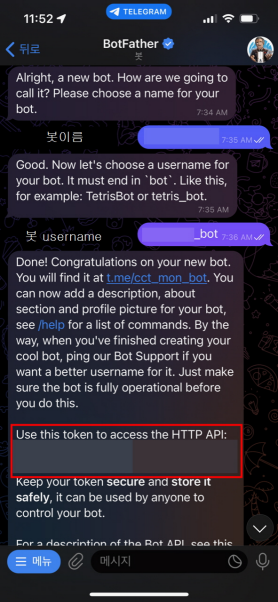
/newbot 명령어로 봇을 만들어 줍니다.
첫번째로 봇의 이름을 지어줍니다. 주번째로 봇의 username을 지어 줍니다. 봇의 username은 bot으로 끝나야 합니다.
username까지 지어주면 토큰이 생성됩니다. 해당 정보를 코드에서 사용해야 하므로 잘 복사해 둡니다.
 |
 |
3. 파이썬 코딩
1) 패키지 설치
패키지는 python-telegram-bot을 설치합니다.
pip install python-telegram-bot2) id 확인
token에는 텔레그램에서 만든 HTTP API 토큰을 사용합니다. 나머지 코드는 동일하게 해서 실행하면 다음과 같은 결과를 얻을 수 있습니다.
import telegram

token = '자신의토큰'
bot = telegram.Bot(token=token)
updates = bot.getUpdates()
for u in updates:
    print(u.message)
실행결과에 에러가 발생하는 경우에는 채팅창에 메시지를 몇개 입력해 보면 된다.

출력되는 정보를 자세히 살펴보면 다음과 같이 되어 있다.
다양한 정보가 있는데 그 중 id번호를 확인하면된다.
{'group_chat_created': False,
'date': 1666999756,
'new_chat_members': [],
'supergroup_chat_created': False,
'entities': [],
'text': 'aaa',
'delete_chat_photo': False,
'message_id': 3,
	'chat': {'first_name': '**',
	'id': 5468******,
	'type': 'private',
	'last_name': '***'},
'photo': [],
'channel_chat_created': False,
'new_chat_photo': [],
'caption_entities': [],
'from': {'first_name': '**',
	'language_code': 'ko',
    'last_name': '***',
    'id': 5468******,
    'is_bot': False}}
확인 후 아래 코드에 아이디번호를 기입하여 sendMessage를 하면 text에 해당하는 메시지가 채팅창으로 출력되는걸 확인 할 수 있다.
import telegram

token = '토큰'
id = 자신의아이디번호

bot = telegram.Bot(token)
bot.sendMessage(chat_id=id, text="테스트 메시지")
3) 채팅 봇 샘플
다음은 챗봇 활용입니다. handler 부분을 용도에 맞게 수정해서 쓰시면 됩니다.
import telegram
from telegram.ext import Updater
from telegram.ext import MessageHandler, Filters

class my_telegram_bot:
    def __init__(self):
        token = '***:***_***' #your token
        self.id = $$$$$$$$$ #your id number
        self.myBot = telegram.Bot(token=token)
        self.updater = Updater(token=token, use_context=True)
        self.sendText("시작합니다.")

    def sendText(self, text):
        self.myBot.sendMessage(chat_id=self.id, text=text)

    def stop(self):
        self.updater.start_polling()
        self.updater.dispatcher.stop()
        self.updater.job_queue.stop()
        self.updater.stop()

    def showText(self):
        updates = self.myBot.getUpdates()
        for m in updates:
            print(m.message)

    def start(self):
        dispatcher = self.updater.dispatcher
        echo_handler = MessageHandler(Filters.text, self.handler)
        dispatcher.add_handler(echo_handler)
        self.updater.start_polling()

    def handler(self, update, context):
        user_text = update.message.text
        if user_text == "안녕":
            self.myBot.send_message(chat_id=self.id, text="안녕하세요 챗봇입니다.")
        elif user_text == "날씨":
            self.myBot.send_message(chat_id=self.id, text="날씨는 좋습니다.")
        else:
            self.myBot.send_message(chat_id=self.id, text=user_text + "라고 하셨습니다.")

myBot = my_telegram_bot()
myBot.start()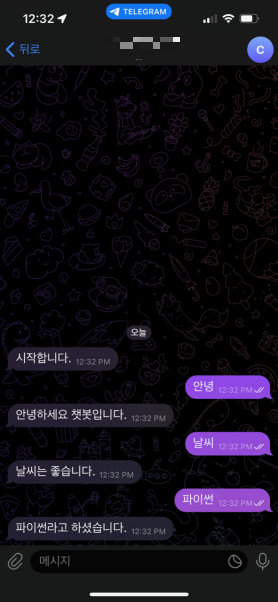
'개발 > python' 카테고리의 다른 글
| 파이썬 판다스 데이터프레임 사용법 - 기초 1 (0) | 2022.10.22 |
|---|---|
| 오라클 클라우드 파이썬 환경 설정 (0) | 2022.10.03 |
| 오라클 클라우드 SSH 접속 (0) | 2022.10.03 |
| 오라클 클라우드 사용 (0) | 2022.10.03 |
| 파이썬 패키지 재설치 쉽게 (0) | 2022.09.17 |

댓글